
Why I Ran This Google Ads Experiment
I’m a student learning digital marketing, and at one point I realized something uncomfortable:
I was watching too many YouTube videos, reading blogs, and consuming endless content – but I was not actually running Google Ads.
Everyone online talks about Google Ads very casually:
- “Just optimize CPC”
- “Just track conversions”
- “Just scale what works”
But nobody talks about how it feels when it’s your own money on the line.
So I stopped consuming and started doing.
I planned a ₹1,000 Google Ads experiment, but in reality I spent ₹616 – and honestly, even that felt heavy as a student.
This is not a success story.
This is a real Google Ads learning case study.
My Objective (What I Was Actually Trying to Achieve)
I was not trying to make profit.
My real objectives were:
- Understand how Google Ads behaves in the real world
- See if people actually search for local services
- Learn Google Ads + GA4 conversion tracking properly
- Experience what works and what breaks in real campaigns
If I could get even one real lead, that itself would be a win.
Business I Chose for This Google Ads Test
I chose a local house cleaning service.
Why this niche?
- People actively search for it
- Easy to understand as a beginner
- No strong branding required
- Commonly used in Google Ads examples
Looking back — it wasn’t the best niche, but it was good enough for learning.
Keyword & Competitor Research (Very Honest Process)
I didn’t use advanced tools or fancy spreadsheets.
Here’s exactly what I did:
- Searched cleaning-related keywords on Google
- Used Google Ads Keyword Planner for ideas
- Observed competitor ads and landing pages
- Checked if ads were running consistently
- Tried to understand user intent, not just keywords
My Assumption
If people are searching for services, they will convert.
Reality?
That assumption was only half true.
Landing Page Strategy (Mobile-First Approach)
Landing Page:
https://practice.growwithanant.com/cleaning-house/
Before running ads, I asked myself one important question:
Who am I designing this landing page for?
After researching local service behavior in India, one thing was clear:
Most local service searches happen on mobile phones.
So I intentionally designed the landing page only for mobile users.
This was a conscious decision.

Why I Optimized Only for Mobile Users
My reasoning was simple:
- Local services are searched on the go
- Most users click ads from mobile phones
- Users want quick actions, not long reading
- Desktop traffic for cleaning services is limited
I treated the landing page like a mobile app screen, not a traditional website.
Mobile Landing Page Design Choices
What I focused on:
- Single-column layout
- Clear headline above the fold
- Short content blocks
- Simple form (Name, Email, BHK Size, Service Type)
- Fast loading speed
- CTA visible without scrolling
Everything was designed assuming:
The user has one hand on the phone and very little patience.
What I Did Right on the Landing Page
Some decisions worked well:
- Page was readable on small screens
- No unnecessary sections
- Easy-to-understand form
- Users scrolled and stayed on the page
This matched the data:
- Users clicked
- Users landed
- Users didn’t bounce instantly
Traffic quality was not the main issue.
Where My Landing Page Failed (Important Lesson)
This is where I was wrong.
Even though the page was mobile-friendly, it wasn’t conversion-friendly.
Problems:
- No WhatsApp button
- No call button pinned on screen
- No trust signals (reviews, local proof)
- No urgency messaging
- Form required commitment without reassurance
For Indian mobile users:
Filling a form feels slower than calling or WhatsApp.
That friction killed conversions.
What This Data Taught Me About Mobile Users
This experiment made mobile behavior very clear:
- Mobile users click fast
- They decide fast
- They don’t like waiting
- They prefer instant communication
My landing page respected mobile design
but ignored mobile psychology.
That was the real gap.
Google Ads Campaign Setup (Phase 1)
Objective: Landing page form submission
Bidding: Maximize Clicks
Budget Used: ₹423
Duration: 4–5 days
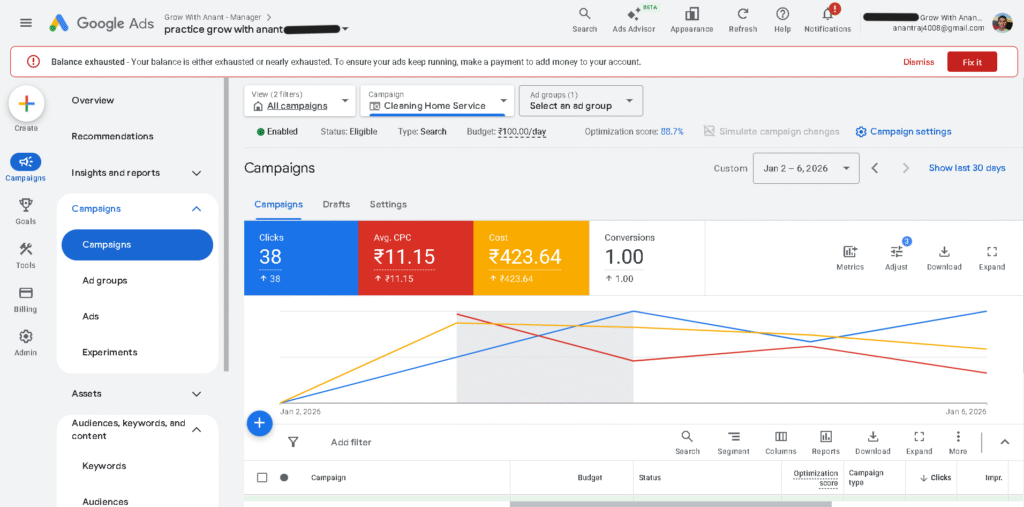
Results:
- Impressions: 483
- Clicks: 38
- Avg CPC: ₹11.15
- Conversions: 1
Seeing that one conversion felt exciting.
But later I realized – it was more luck than control.
Phase 2: What I Changed (And Why)
My new goal was simple:
Reduce CPC because of limited student budget
Changes I made:
- Reduced daily budget to ₹50/day
- Focused on cheaper keywords
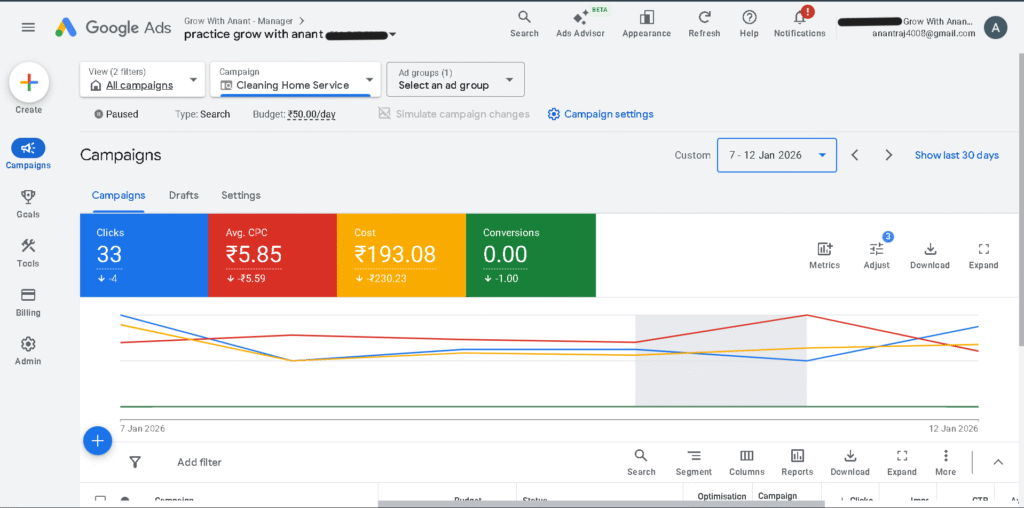
Results:
- Impressions: 845
- Clicks: 33
- Avg CPC: ₹5.85
- Cost: ₹193
- Conversions: 0
This was my first real Google Ads reality check.
Cheap clicks ≠ serious customers.
Total Campaign Performance Summary
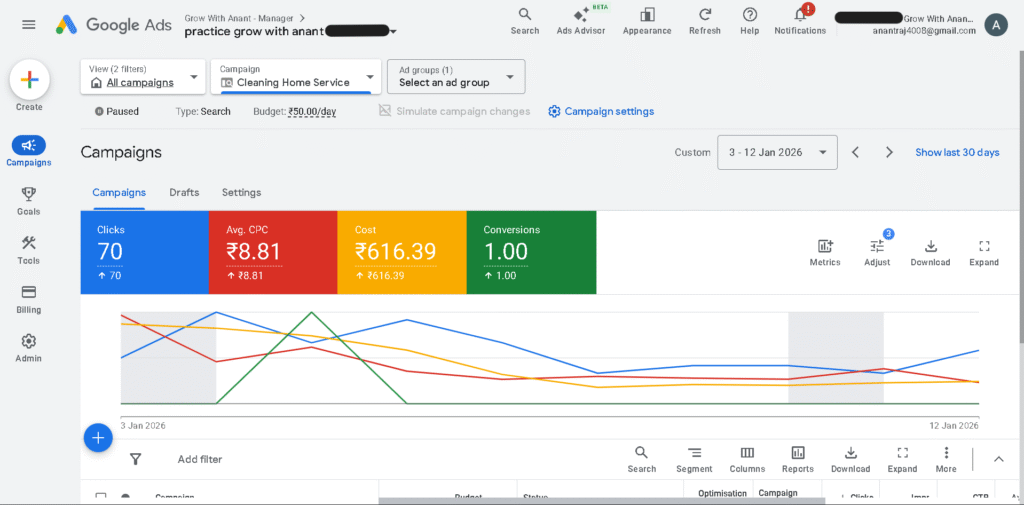
- Impressions: 1.33k
- Clicks: 70
- Avg CPC: ₹8.81
- Total Cost: ₹616.39
- Conversions: 1
Tracking Setup (One Thing I’m Proud Of)
I made sure tracking worked properly:
- Google Ads conversion tracking set up
- GA4 connected
- Form submission tracked via Google Tag Manager
Yes, I made one mistake — I didn’t exclude my IP address.
But real user data was still tracked correctly.
So when conversions didn’t happen, I knew:
• This was not a tracking issue.
• This was a funnel issue.
That clarity itself was a big win.
What I Expected vs What Actually Happened
Expected:
- 2–3 leads
- CPC around ₹10–₹15
- Clear learning
Reality:
- CPC was better than expected
- CTR was decent
- Only 1 conversion
Emotionally — disappointing.
Logically — extremely educational.
Mistakes I Know I Made
I was clearly wrong in these areas:
- Optimized for clicks instead of intent
- Underestimated landing page importance
- Didn’t add WhatsApp or call options
- Expected results too quickly
- Treated Google Ads like a shortcut
These mistakes directly affected results.
What Actually Worked
Despite low conversions:
- People clicked ads
- Search demand existed
- CPC was affordable
- Tracking was correct
The problem wasn’t Google Ads.
The problem was how I converted traffic.
Why I Paused the Campaign
I didn’t pause because I lost hope.
I paused because:
Spending more money without fixing the funnel would be stupid.
Pausing wasn’t failure.
It was discipline.
What I’ll Do Differently Next Time
Next experiment, I will:
- Choose a more urgent service niche
- Build a WhatsApp-first landing page
- Add trust signals and local proof
- Track calls properly
- Optimize for conversions, not clicks
I’ll treat Google Ads like an experiment, not a gamble.
Final Thoughts
Was this campaign profitable?
No (it was for practice, not profit)
Was it worth it?
Yes 100%
What ₹616 taught me:
- How Google Ads really behaves
- How fast money burns
- How important funnels are
- How different theory is from reality
Most people talk about Google Ads.
I ran them.
And I documented what went wrong.
That’s how I plan to get better.
truly loved the work u have done ,this is really inspiring.
Thank you so much! I’m really glad you found it inspiring 😊