This case study is not about showing results or flexing numbers.
This is about how I think and plan a Google Ads campaign, even when I don’t want to spend money. Everything here is based on assumptions and logic. I’m calling this a 0 Rupees case study because the goal is learning, not profit.
If you want to see a real campaign where I actually spent money, you can check out my previous case study.
Previous Case Study –
Objective
My main objective with this campaign is simple:
- Learn Google Ads in a practical way
- Improve my campaign structure and decision making
- Practice keyword intent, budget allocation, and tracking
- Avoid repeating the mistakes I made in my previous campaign
I’m not expecting crazy results. Even 1–3 conversions in this budget would be a big win for me.
Campaign Overview (Assumed Setup)
For this case study, I chose a Geyser Repair service because it’s a high-intent local service and mostly call-based.
- Campaign type: Search only
- Location: Delhi (you can choose any city)
- Daily budget: ₹150
- Duration: 14 days
- Total spend (assumed): ₹1800 – ₹2000
- Ad schedule: 9 AM – 7 PM
- Device targeting: Mobile only
I’m targeting mobile users only because most local service searches happen on mobile, and calls are easier from phones.
My Assumptions Before Running the Campaign
Since this is a learning case study, all numbers are assumed based on my research and previous experience.
- Expected CPC: ₹15 – ₹40
- Expected CTR: 5% – 10%
- Expected conversions: 1 – 3
If I can get even one genuine lead in this budget, I’ll consider the campaign structure successful.
Campaign Structure (How I Planned It)
Instead of randomly creating ad groups, I divided everything based on user intent and urgency.
Ad Group 1: Emergency Geyser Service (High Intent)
- Budget allocation: ₹800
- Keywords: 5 – 6
This is the most important ad group. People searching for emergency geyser repair usually need help immediately, so even though CPC might be higher, the intent is strong.
Ad Group 2: Water Leakage (Serious Problem)
- Budget allocation: ₹600
- Keywords: 4 – 6
Water leakage is a serious issue. Users searching for this are already stressed and more likely to call instead of browsing.
Ad Group 3: General Repair (Medium Intent)
- Budget allocation: ₹400
- Keywords: 5 – 8
This is medium intent. Some users might compare options, but many still need quick service.
Ad Group 4: Installation (Low Intent)
- Budget allocation: ₹200
- Keywords: 2 – 4
Installation is usually one-time and not urgent. That’s why I kept the budget low compared to repair-based ad groups.
Keyword & Match Type Strategy
Because my budget is limited, I’m not using broad match.
- Exact match for high-cost, high-intent keywords
- Phrase match for slightly broader but still controlled searches
My focus is not keyword quantity.
My focus is search term quality and intent.
Negative Keywords
For negative keywords, I used AI tools like ChatGPT to generate a base list. Most negatives are common, like:
- free
- diy
- how to fix
- youtube
- job / career
This helps save money and avoid useless clicks.
Ad Copies Strategy
I created around 20 ad copies (with the help of chatgpt ) for each ad group.
After that, I researched competitors and shortlisted copies that:
- Sound urgent
- Focus on problems
- Encourage calls instead of form fills
I didn’t blindly use all copies. I selected the ones that feel most likely to convert.
Landing Page Strategy
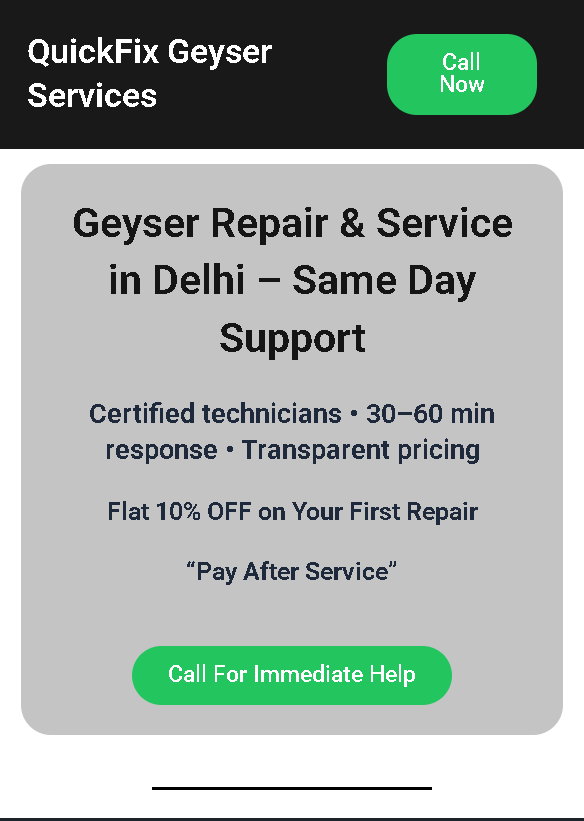
I kept the landing page simple and focused on trust and calls.
My landing Page – https://practice.growwithanant.com/quickfix-geyser-services/
What I included:
- Clear headline and sub-heading
- Strong call-to-action (Call button on top)
- Trust signals like:
- “Trusted by local households”
- 5-star rating
- Google Maps included
- List of services
- Simple “How it works” section
- Local area names (Sector 46, 26, etc.)
- Call button + form
- Address and Google Maps again at the bottom
My primary goal is calls, forms are secondary.
Why I Optimized Only for Mobile Users
My reasoning was simple:
- Local services are searched on the go
- Most users click ads from mobile phones
- Users want quick actions, not long reading
- Desktop traffic for Geyser Repair is limited
I treated the landing page like a mobile app screen, not a traditional website.
Tracking Setup
Tracking is something I ignored earlier, and I don’t want to repeat that mistake.
Tools I used:
- Google Tag Manager (GTM)
- Google Analytics 4 (GA4)
Conversions tracked:
- Form submission (thank you page)
- Call button click
I’m using my own phone number, and I might not always be available to pick calls. So for learning purposes, I’m counting call button clicks as conversions, not actual call duration.
My Bidding Strategy
- First 7 days: Maximize Clicks → to collect data, understand CPC and search terms
- After that: Maximize Conversions → once some conversion signals are available
I’m doing this to let Google learn first before pushing it toward conversions.
Expected KPIs (Assumed)
- CTR: 5 – 10%
- CPC: ₹15 – ₹40
- Clicks: 50 – 120
- Conversions: 1 – 3
- Cost per conversion: ₹600 – ₹1800
Even one conversion will tell me that the structure and intent selection are correct.
What I’ll Improve Next Time
Based on my previous campaign mistakes, next time I’ll:
- Add call-only ads for emergency searches
- Improve negative keywords weekly
- Use location extensions
- Improve landing page speed
- Pause low-performing ad copies faster
My Final Thoughts
This case study is not meant to impress people who only care about screenshots.
It’s meant to show how I think, plan, and execute Google Ads campaigns, even before spending real money.
This is how I practice, learn, and improve step by step.