
Performance Marketing Case Study: IronCore Fitness
Building a Gym Lead-Generation Campaign with Google Ads, Meta Ads and Conversion Tracking
Project type: Self-directed portfolio project | Focus: Campaign execution, analytics implementation and troubleshooting
Project Overview
This performance marketing case study documents my hands-on work building a lead-generation campaign setup for IronCore Fitness, a gym concept targeting potential members in Delhi, India.
The project focused on the practical execution of a digital advertising funnel, including Google Search Ads, Meta Ads, a WordPress landing page, Google Tag Manager (GTM), Google Analytics 4 (GA4), Google Ads conversion tracking and Meta Pixel.
My objective was to understand how campaign configuration, landing-page experience and conversion measurement work together before a paid campaign goes live.
Project status: Campaigns configured and tracking tested. No paid advertising spend was made, so live campaign performance has not been measured.
Project Details
- Industry: Fitness and gym memberships
- Target market: Delhi, India
- Campaign objective: Generate membership enquiries
- Primary offer: First month for ₹999
- Planned test budget: ₹3,000 over 15 days
- Actual advertising spend: ₹0
- Tools: Google Ads, Meta Ads Manager, WordPress, GTM, GA4 and Meta Pixel
[Add Screenshot: IronCore Fitness landing page]
Business Objective and Campaign Strategy
The primary objective was to build a measurable lead-generation funnel that could attract relevant prospects, communicate a gym membership offer and record enquiry submissions.
The initial audience hypothesis focused on people approximately 18–35 years old in Delhi who were interested in joining a gym, strength training or improving their fitness routine.
The ₹999 introductory membership offer was intended to give prospective members a clear reason to enquire.
The planned customer journey was:
Advertisement → Landing page or lead form → Enquiry submission → Conversion tracking → Business follow-up
This project allowed me to work through the setup of each component and identify the checks required before launching paid campaigns.
Google Ads Campaign Setup
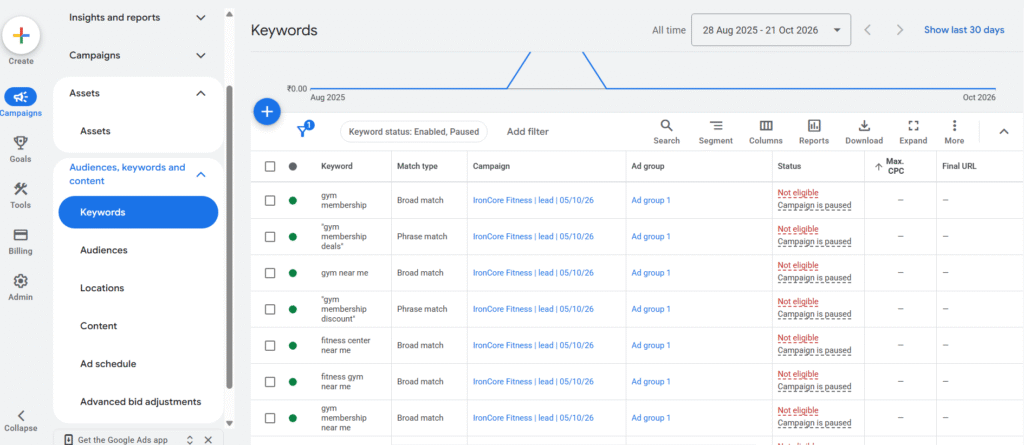
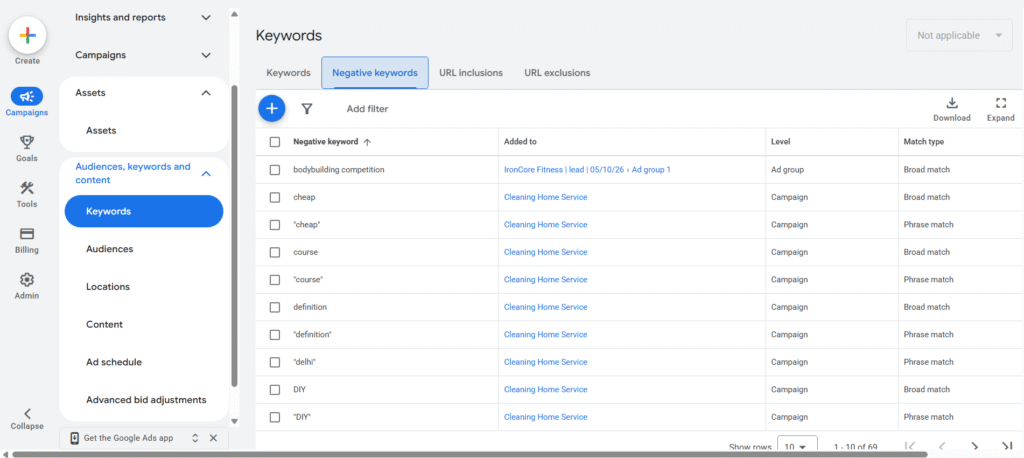
I configured a Google Search campaign designed to reach users actively searching for gym memberships and related fitness services.
What I implemented
- One ad group with 18 keywords.
- A combination of broad and phrase match types.
- Negative keyword planning.
- Hindi and English language settings.
- Delhi-focused location targeting, with Noida, Gurugram and Faridabad excluded.
- Responsive search ad messaging and campaign assets.
- Maximize conversions as the intended bidding strategy.
- Lead-form submission as the intended conversion goal.
Keyword Research and Negative Keywords
The keyword strategy focused on relevant gym-related search intent. I also prepared negative keywords such as “dumbbell,” “free workout,” “gym business,” “gym design,” “gym employment” and “gym franchise.”
These terms were intended to help filter searches associated with equipment, free fitness information, jobs and business opportunities rather than membership enquiries.
The list was a starting point. Actual search-term data would be required to refine the negative keyword strategy after launch.
Ad Copy and Offer Consistency
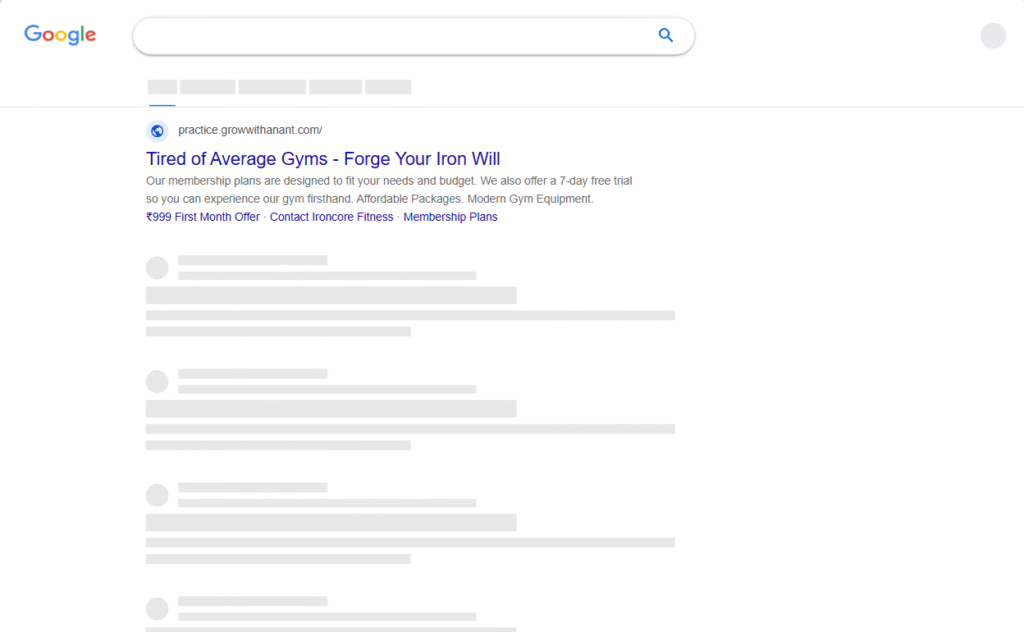
The ad messaging focused on fitness, strength training and membership enquiries.
During the planning process, I identified an important quality check: all ad copy should match the actual offer on the landing page. A previously drafted seven-day free-trial headline should only be used if that trial genuinely exists. Otherwise, the advertising should consistently communicate the ₹999 introductory membership offer.
Learning: Campaign configuration is only the starting point. Keyword relevance, geographic targeting, offer consistency and conversion readiness all need to be checked before launch.
[Add Screenshot: Google Ads campaign, keywords and ad assets]
Meta Ads Campaign Setup
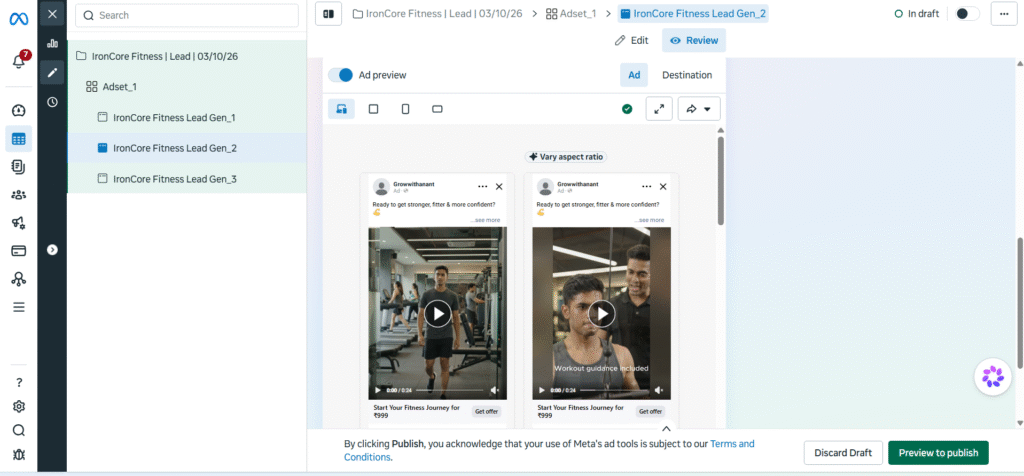
I configured a Meta lead-generation campaign with one ad set and three creative concepts.
| Ad creative | Format | Objective |
|---|---|---|
| Ready to Fit | Introduce the gym offer | |
| Problem and transformation | Video | Address inconsistent workout routines |
| Motivational fitness concept | Video | Encourage users to begin their fitness journey |
The motivational concept used the message, “Your stronger version starts with your next workout.”
The intention was to explore different creative approaches while maintaining a consistent lead-generation objective.
Because the campaign did not run with paid spend, I have not identified a winning creative or claimed any performance improvement.
What I Learned
- Creative messaging should have a clear purpose and call to action.
- The offer must remain consistent across ads, landing pages and forms.
- Different creative concepts can be compared only after sufficient campaign delivery and data collection.
- Meta website events and instant-form submissions must be tracked according to the actual conversion path.
[Add Screenshot: Meta Ads Manager and three creative previews]
WordPress Landing Page and Conversion Tracking
A landing page is an important part of a lead-generation campaign because it connects the advertising message with the user’s next action.
I built a dedicated WordPress landing-page experience for the IronCore Fitness offer and configured the lead form and thank-you-page flow.
Tracking tools and implementation
WordPress: Used to create the landing-page experience.
Google Tag Manager: Used to configure tags and triggers and troubleshoot event behavior.
Google Analytics 4: Used to verify website event receipt.
Google Ads: Used to configure the advertising conversion measurement setup.
Meta Pixel: Installed and tested in Meta Events Manager, as observed during the project.
GA4 Lead Event Testing
I configured a GTM event tag named GA4 Event - Ironcore Lead and tested the form submission flow.
During testing, the thank-you-page trigger fired, and the GA4 generate_lead event appeared in Realtime.
This confirmed that the test event could reach GA4. It did not establish that a live advertising campaign had generated a lead or that Google Ads attribution was fully operational.
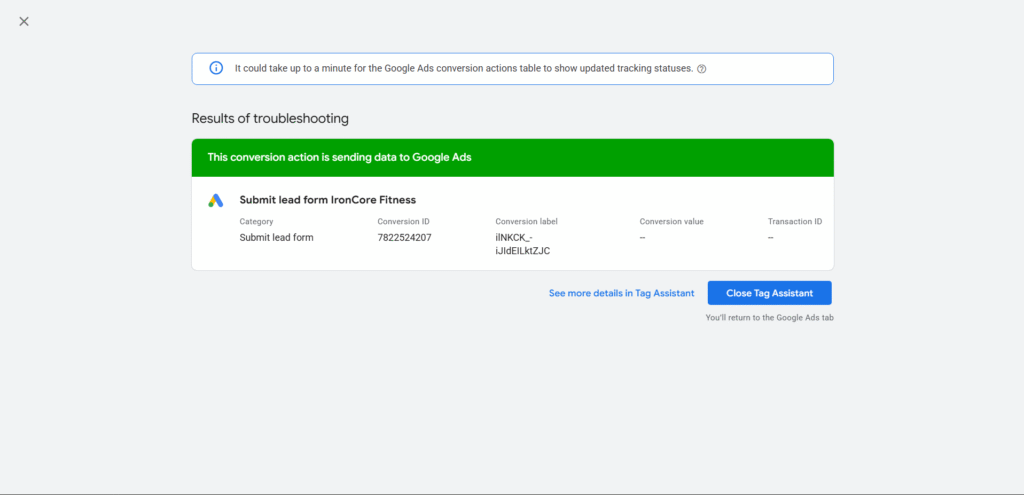
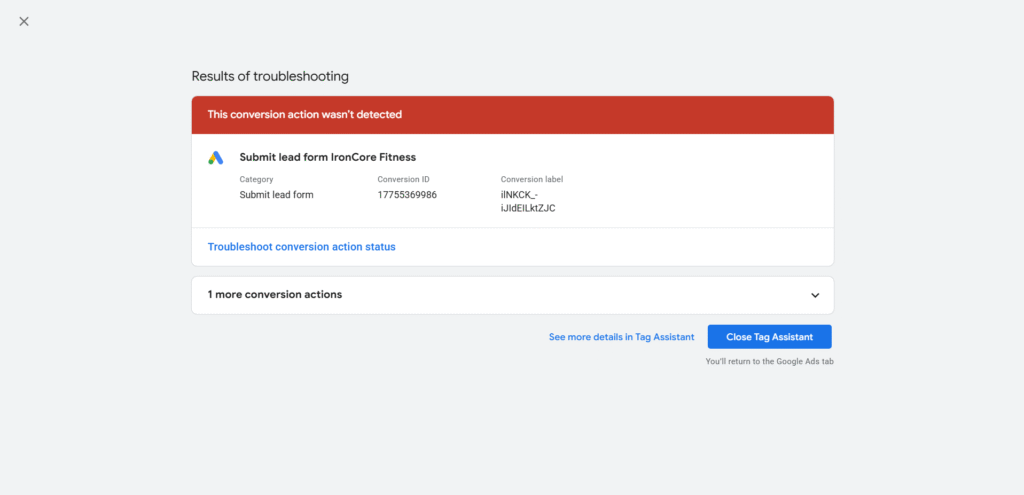
The Google Ads conversion action previously displayed an “Inactive / Needs attention” status, so its final readiness still needs to be verified before paid launch.
[Add Screenshot: GTM Preview showing the relevant tag and trigger]
[Add Screenshot: GA4 Realtime showing the test generate_lead event]
Technical Challenge: Google Tag Manager Troubleshooting
One of the most useful parts of this performance marketing project was troubleshooting the tracking setup.
Initially, the GTM container was not being detected consistently. I also had to work through confusion around multiple containers and the placement of tracking code within the wider website setup.
After addressing the container issue, the expected GA4 event did not immediately appear. I checked the form submission, thank-you-page redirect, GTM trigger behavior and event receipt to isolate the problem.
My troubleshooting approach
- Check whether the correct GTM container is loaded on the intended page.
- Test the form submission and thank-you-page redirect.
- Verify whether the intended GTM trigger fires.
- Confirm that the relevant tag executes.
- Check whether GA4 receives the expected event.
- Verify the advertising platform’s conversion action separately.
Key Learning
A tag firing, an analytics event being received and an advertising platform attributing a conversion are three different checkpoints.
This experience reinforced the importance of systematic debugging and end-to-end conversion tracking validation before spending money on ads.
[Add Screenshot: GTM Preview or Tag Assistant troubleshooting evidence]
Project Results and Measurement Status
The project demonstrates campaign implementation and tracking tests rather than live advertising performance.
| Metric or activity | Status |
|---|---|
| Google Search Ads setup | Configured |
| Meta Ads setup | Configured |
| WordPress landing page | Built |
| Lead form and thank-you-page flow | Tested |
GA4 generate_lead event | Observed during testing |
| GTM troubleshooting | Performed |
| Meta Pixel | Reported installed and tested |
| Google Ads conversion readiness | Final verification required |
| Paid impressions and clicks | Not measured |
| Live leads and cost per lead | Not measured |
| Revenue and return on ad spend | Not measured |
The planned test budget was ₹3,000 over 15 days, but actual advertising spend was ₹0.
Since no paid advertising spend was made, there are no verified results for impressions, clicks, CTR, CPC, leads, cost per lead or return on ad spend.
The main outcome was the implementation and testing of the campaign setup, together with the identification of issues that must be resolved before launch.
What I Would Optimize After Launch
Once conversion readiness is verified and an appropriate budget is approved, I would evaluate campaign performance using:
- Click-through rate (CTR): To assess how frequently impressions lead to clicks.
- Cost per click (CPC): To understand the cost of attracting visitors.
- Landing-page conversion rate: To evaluate the proportion of visitors who submit an enquiry.
- Cost per lead (CPL): To measure advertising cost per lead.
- Lead quality: To assess whether enquiries translate into genuine membership opportunities.
- Membership conversion rate: To understand how effectively leads become members.
- Return on ad spend (ROAS): To evaluate attributed revenue against advertising spend when reliable revenue data is available.
I would also review search-term reports, geographic performance, creative delivery and lead quality before making optimization decisions.
Key Learnings
This project helped me understand how performance marketing connects campaign execution with measurement.
- Campaign structure and keyword selection should reflect business intent.
- Ad copy and landing-page messaging must communicate a consistent offer.
- Conversion tracking needs to be tested before paid campaigns go live.
- GTM debugging requires checking each stage of the event flow.
- A successful test event is not the same as verified advertising attribution.
- Campaign optimization requires real data rather than assumptions.
- Honest reporting is essential when presenting work in a professional portfolio.
Skills and Tools Demonstrated
Paid advertising: Google Search Ads, Meta Ads setup, keyword planning, negative keywords, ad copy and creative planning.
Analytics and tracking: WordPress, Google Tag Manager, GA4 Realtime, event testing, Meta Pixel and conversion-flow validation.
Problem-solving: Tag troubleshooting, trigger verification, campaign quality assurance and identification of conversion-readiness gaps.
Performance marketing: Lead-generation funnel planning, offer consistency, measurement planning and future optimization strategy.
Conclusion
The IronCore Fitness project demonstrates my practical learning in performance marketing, from campaign configuration and landing-page setup to conversion tracking and troubleshooting.
It helped me understand that effective advertising requires more than creating ads. Campaigns also need a relevant offer, a clear user journey, reliable measurement and a structured process for evaluating performance.
My next step is to complete the remaining conversion-readiness checks and, if an appropriate budget becomes available, run a controlled test to collect real performance data.
Project disclaimer: This was a self-directed portfolio project. Campaigns were configured and tracking was tested, but no paid media spend was made. Live campaign performance and lead-generation results have not been measured.
GrowWithAnant – Learn. Create. Grow.